Servers & monitoring


Umami
Simple, privacy-first web analytics you can self-host. No cookies, no personal data collection.
Release notes / v3.5.0
Released 2026-11-12. Snapshot from the included release data, not a live check.
Umami `v3.5.0` adds **browser error tracking**, improved replay navigation, and fixes across tracking, reporting, and sharing. ## New features ### Browser error tracking Capture JavaScript errors alongside your analytics and investigate affected visits. - Automatically capture uncaught exceptions and unhandled promise rejections with `data-errors="true"` - Capture handled errors with `umami.captureException()` - Group errors into issues with stack traces, occurrence counts, and ses…
Read the full release notes on GitHub ↗Available on these platforms
Requires a self-hosted Umami server.
Server systems, compatibility details and official sources
The analytics dashboard is a browser application. The analytics server, tracking script and hosted service have different roles; this is not a native phone client.
Official availability checked 2026-11-12. Availability is not feature parity. The recorded release and license refer to the linked source project; separate clients can differ. No install or compatibility test was run.
Before you install
Simple analytics, no cookies.
- What does it run on?
- A Node.js app with a PostgreSQL database, self-hosted - Docker is the documented route.
- Where is my data?
- Traffic, referrers and events live in your own database, with no cookies and no personal data collection.
- What will I maintain?
- The app, its database and updates. Focused on simplicity: one clean dashboard rather than a maze of reports.
Advice and funding routes source-checked November 12, 2026. Researched, not an install or restore test. Installation source ↗ · Report a correction
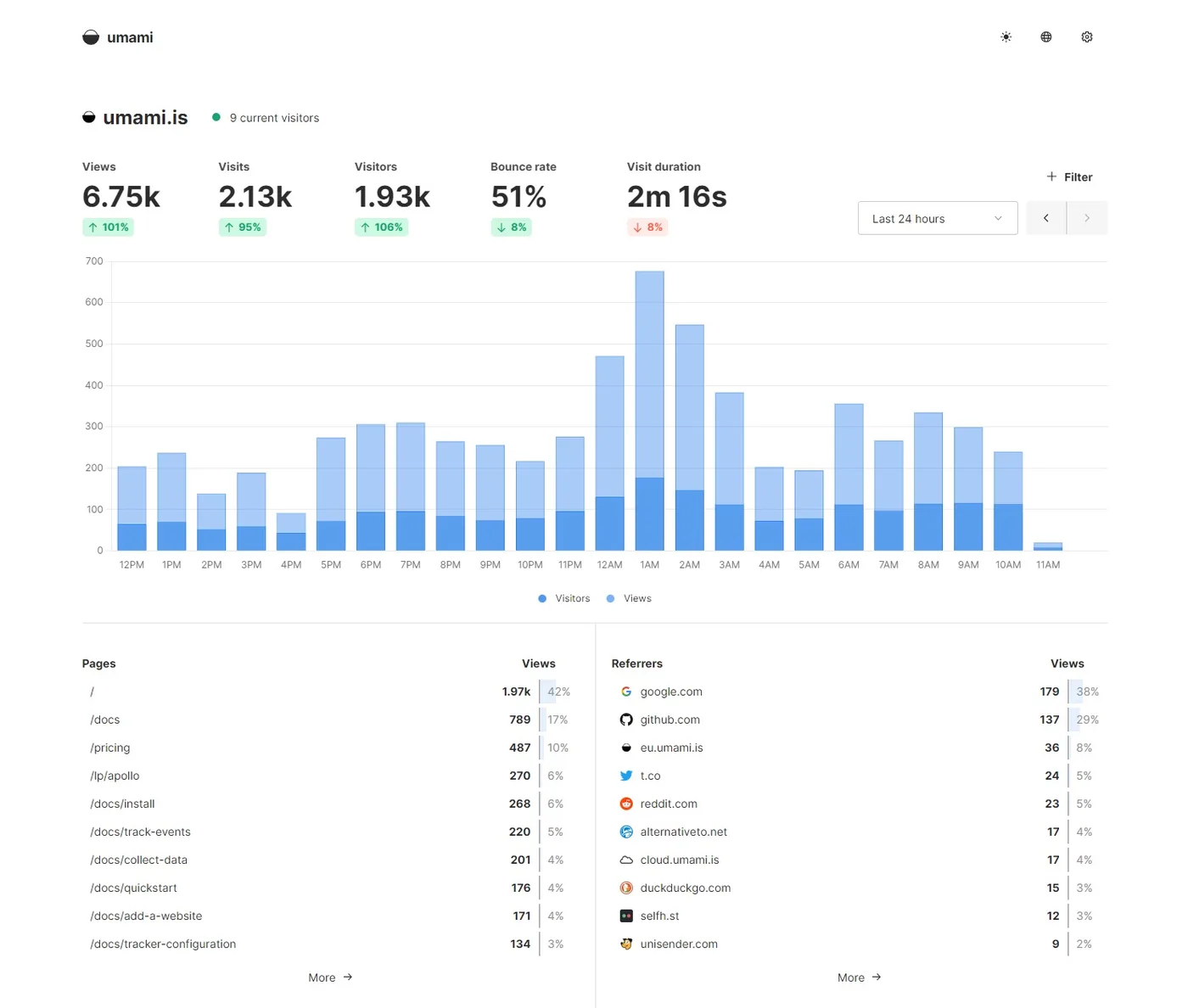
Umami is a self-hosted analytics platform focused on simplicity: traffic, referrers, and events on a clean dashboard, with no cookies and no personal data collection. It runs on Node.js with a PostgreSQL database.
Quick start
Verified against Umami’s own documentation on November 8, 2026.
Jump to: Docker Compose · Ubuntu Server · NixOS
Docker Compose
Umami’s own repo ships a compose file with its PostgreSQL database. Save
this as compose.yaml:
services:
  umami:
    image: ghcr.io/umami-software/umami:latest
    ports:
      - "3000:3000"
    environment:
      DATABASE_URL: postgresql://umami:umami@db:5432/umami
      APP_SECRET: replace-with-a-random-string
      # needed only for two-factor login: openssl rand -hex 32
      # TWO_FACTOR_ENCRYPTION_KEY: replace-with-a-64-character-hex-string
    depends_on:
      db:
        condition: service_healthy
    restart: always
  db:
    image: postgres:15-alpine
    environment:
      POSTGRES_DB: umami
      POSTGRES_USER: umami
      POSTGRES_PASSWORD: umami
    volumes:
      - umami-db-data:/var/lib/postgresql/data
    restart: always
    healthcheck:
      test: ["CMD-SHELL", "pg_isready -U $${POSTGRES_USER} -d $${POSTGRES_DB}"]
      interval: 5s
      timeout: 5s
      retries: 5
volumes:
  umami-db-data:
Change APP_SECRET and the database password before exposing it. Then
docker compose up -d and open http://localhost:3000. Umami creates a
default login (admin / umami) when it first sets up the database;
change it immediately after your first login. Works on any host with Docker and the Compose plugin: on Ubuntu Server,
sudo apt install docker.io docker-compose-v2 covers both; on NixOS,
virtualisation.docker.enable = true; enables Docker.
Docker Compose · Simple, privacy-first web analytics you can self-host. No cookies, no personal data collection. Paste into your AI assistant. It may only be able to guide you. Review changes before running anything.
Researched from the project's documentation. Checked 2026-11-12. No AI account or connection is needed here.
Read or copy the prompt manually
Ubuntu Server
Umami documents a from-source install (Node.js 20.19+ and PostgreSQL required):
git clone https://github.com/umami-software/umami.git
cd umami
pnpm install
echo "DATABASE_URL=postgresql://umami:password@localhost:5432/umami" > .env
pnpm build
pnpm start
Then open http://localhost:3000. First login is admin / umami; change
it immediately.
Ubuntu Server · Simple, privacy-first web analytics you can self-host. No cookies, no personal data collection. Paste into your AI assistant. It may only be able to guide you. Review changes before running anything.
Researched from the project's documentation. Checked 2026-11-12. No AI account or connection is needed here.
Read or copy the prompt manually
NixOS
services.umami.enable = true;Then sudo nixos-rebuild switch and open http://localhost:3000. The
module creates its PostgreSQL database automatically. First login is
admin / umami; change it immediately.
NixOS · Simple, privacy-first web analytics you can self-host. No cookies, no personal data collection. Paste into your AI assistant. It may only be able to guide you. Review changes before running anything.
Researched from the project's documentation. Checked 2026-11-12. No AI account or connection is needed here.
Read or copy the prompt manually
Why it’s listed
A solid MIT-licensed alternative in the same space as Plausible. If you want the most permissive license for an analytics deployment, this is the pick.
Tags: Analytics, Self-hosted, NixOS module
Want help setting this up? Ask FOSSadmin ↗